
TL;DR
If you like TCP analysis with Wireshark you will enjoy this article! Join me on a deep dive through the transport layer. I bet you’ll be surprised in the end – as I was.
After my last post received a little bit more attention than usual for this blog, I realized that a crucial next step for gaining further popularity might be writing in English. Let’s go:
Some colleagues asked for help because they had trouble downloading a file from a NetApp filer. Speed was bad and the SMB transfer broke off after a few minutes. They already did some packet analysis from the client side and told me about many retransmissions they have seen. So, there might be packet loss somewhere on the way to the NetApp…?
The best approach to further investigate here is doing a multipoint measurement: I decided to set up a second measuring point directly in front of the NetApp. This makes it possible to later pull both measuring points step by step together until the device which is causing the packet loss could be finally identified. But as it turned out, this was not necessary. The packet loss seemed to occur after the second measuring point – inside the NetApp. Let me show you:
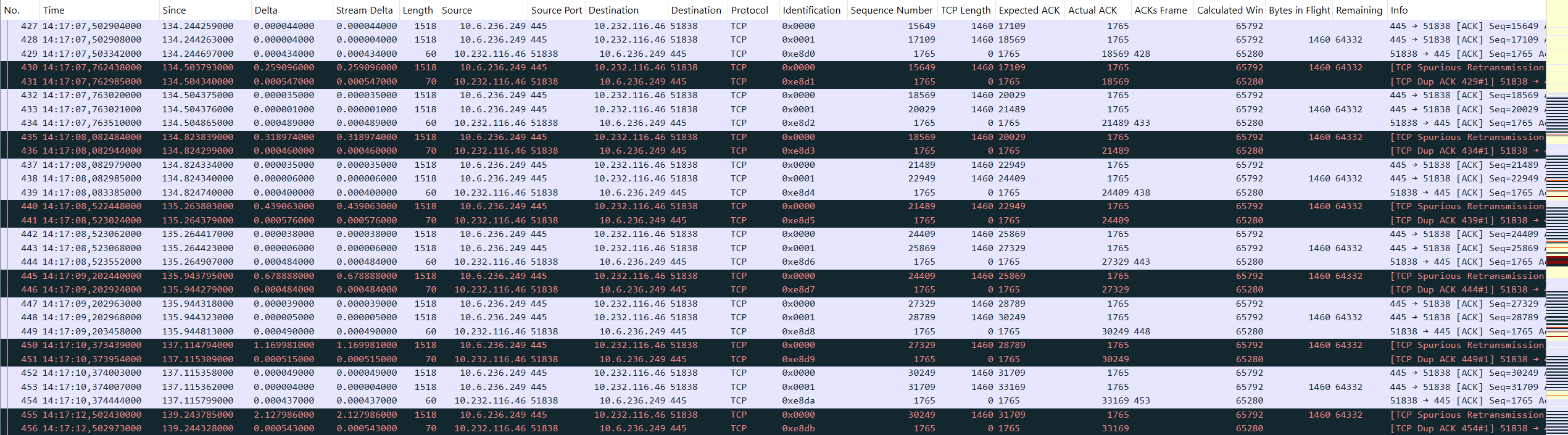
You can see a repeating pattern in which the NetApp always sends two TCP segments with 1460 bytes each. Afterwards, the client ACKs both segments: the Actual ACK value of the clients acknowledgement packet matches the Expected ACK value of the second data segment. Nevertheless, the NetApp starts a timer-based retransmission of the first of both data segments. The client then sends the same ACK again. Finally, the next two data segments are beeing sent and the pattern repeats. Please also notice the exponential backoff for each retransmission which eventually causes the connection to die after it reaches a value of 16 seconds (not shown in the figure).
What also looks strange are the ip.id values used by the NetApp but they are likely not part of the problem because the client still ACKs the packets. At this point I was quite confident that we should create a case at NetApp support. But on the other hand, how likely is it that we have found such a fundamental bug in a NetApp system?! I asked myself what function of a TCP stack could cause that a segment which was proven to be received isn’t ACKed?! Bingo! An incorrect checksum could be a reason for this. So, I applied the filter tcp.checksum.status != "Good" or ip.checksum.status != "Good". Of course, I did not forget to enable the Wireshark checksum validation before.
Quite disappointed that my filter did not show any packets I again scrolled through the unfiltered packet list… but wait… what was that?!
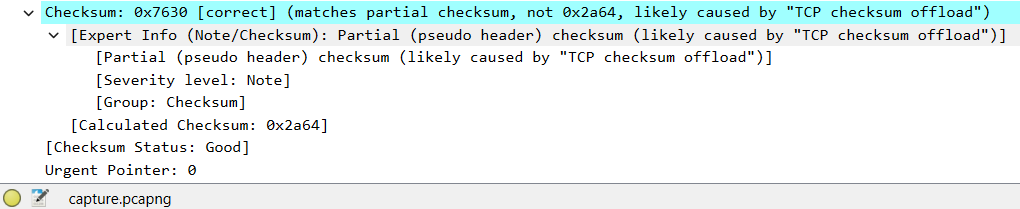
The status of the checksum is marked as good but it somehow only matches the „partial checksum“ of the pseudo header. I’ve heard about the pseudo header before: Basically, the TCP checksum is not only calculated over the TCP header and its payload but also over some fields of the encapsulating IP header which are temporarily composed into the so called Pseudo Header.1 But I’ve never heard about partial checksums… If you have visited the above link about enabling Wireshark checksum validation, you might have seen that the next section on the same page is about partial checksums:
Linux and Windows, when offloading checksums, will calculate the contribution from the pseudo header and place it in the checksum field. The driver then directs the hardware to calculate the checksum over the payload area, which will produce the correct result including the pseudo header’s portion of the sum as a matter of mathematics.
So, after the OS calculated the pseudo header’s part of the checksum, the remaining checksum part of the TCP segment itself is added in hardware. A partial checksum match means that only the pseudo header part of the checksum was found in the segment’s checksum field. This is quite common when you capture on the end device… but wait… I did not capture on the end device! Remember:
I decided to set up a second measuring point directly in front of the NetApp.
I captured by using the Allegro Network Multimeter to avoid the drawbacks of local packet captures, pretty much the same way like I described in my last post. This means that the partial checksum warning is no capturing artifact. It is exactly what’s happening on the wire. 🤯
Suddenly, I became quite confident that I was now on the right track. By clicking through the fields of the checksum error I found that tcp.checksum.partial must be the filter which gives me all these broken packets. But instead of filtering them, I’ve created a coloring rule. And suddenly, the problem was clearly visible:
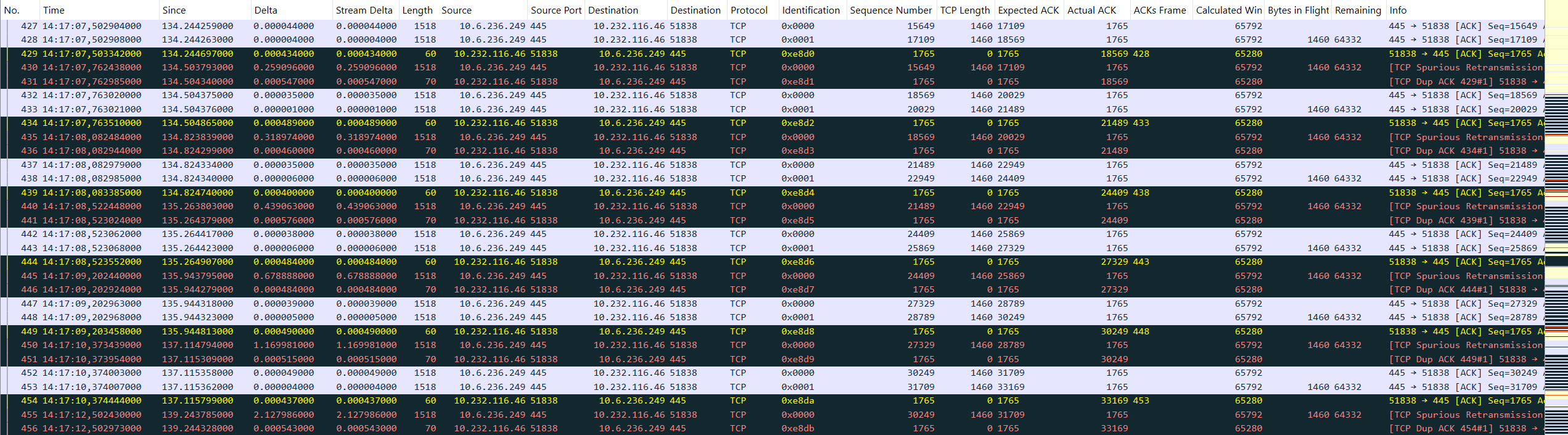
Each of the spurious retransmissions is preceded by an ACK with a partial checksum error. So, we can conclude:
The NetApp filer behaves correct – the client does not!
Meanwhile, there have also been further investigations of the colleagues who are responsible for the SMB client (Windows VM). They pointed out that the issue might be related to a registry value named DisableTaskOffload which was set to 1 on the SMB client for other reasons. Setting it to 0 which actually enables all of the task offloads from the TCP/IP transport finally fixed the issue.2 No more retransmissions and no more partial checksums could be observed afterwards.
So, what was the actual problem? I can only guess: The Windows VM expected all offloading activity to be disabled, like it was configured in the registry. Consequently, the operating system must have calculated not only the pseudo header’s part of the checksum but also the part of the TCP segment itself. When for some reason, the hardware isn’t aware that it should omit all offloading activity it will likely revert the fully calculated checksum field to a partial checksum again. This is because „the checksum field is the 16 bit one’s complement of the one’s complement sum of all 16 bit words in the header and text.“3 A sum in binary system is close to an exclusive OR which applied twice cancels itself out. Therefore, I assume a driver problem or an incompatibility with the underlying hypervisor. And please, do not ask me why the issue only affected some but not all segments… Your feedback on these questions is highly appreciated! 😉
Photo by Andryck Lopez on Unsplash
Ein Kommentar zu “Packets don’t lie – Provided you don’t overlook any evidence”
You know this …
https://lutz.donnerhacke.de/Blog/Minus-Null