
TL;DR
This article is about the importance of Router Advertisements in IPv6 networks. I’ll point out why stateful DHCPv6 is an addition but definitely no replacement for RAs.
No, of course I don’t mean a real thunder. Let me just begin to explain what problem I had with IPv6. I’m going to tell you more about the Thunder later… Anyway, I was very happy when my house finally got connected to a brand-new FTTH network. But after a few weeks I noticed some odd behaviour with IPv6: speedtests and other websites with IPv6 checker often told me that I have no IPv6 address and ping6 to arbitrary destinations failed.
When I looked into my FRITZ!Box the observed pattern was always the same: My Internet connection came up, I received a public IPv4 address, an IPv6 GUA address for my WAN interface as well as a /60 delegated prefix – a full dual-stack connection. While the prefix had a valid lifetime of 28800 seconds, the WAN address had only 1 hour:
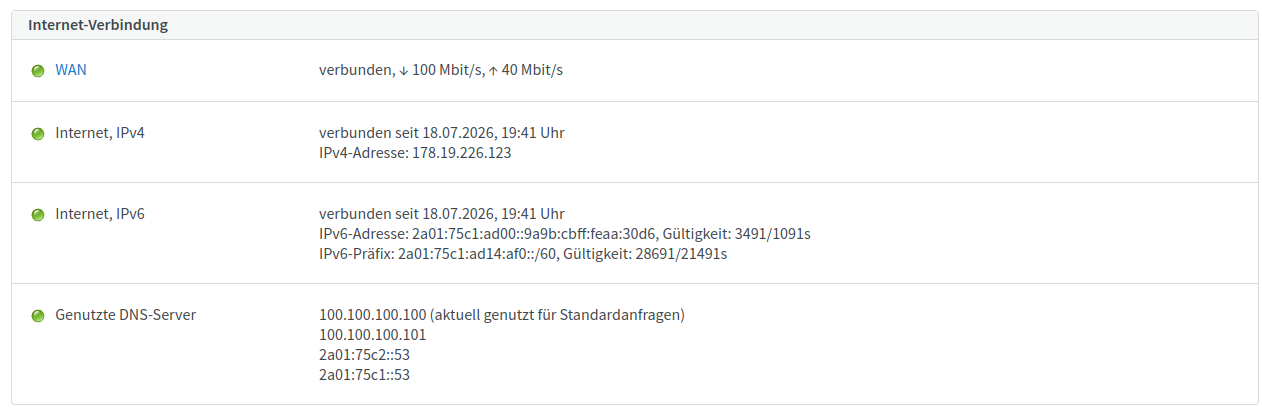
During that hour, the lifetime of the WAN address kept decreasing until it finally reached 0/0s. 🧐 The delegated prefix instead was renewed repeatedly as one would expect.
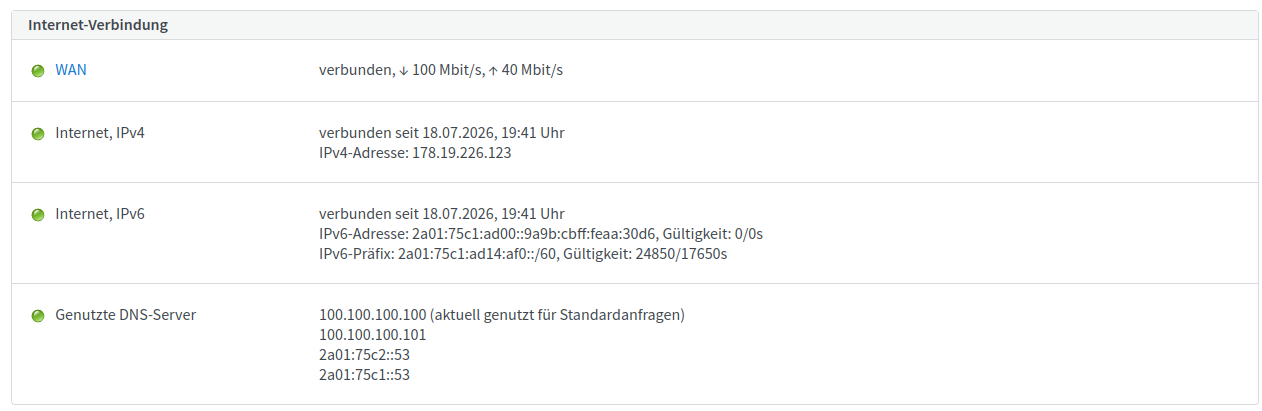
Before the WAN address timed out I had normal IPv6 connectivity. After that, the problems mentioned above occurred. For the moment, this looked unaccountable to me because in IPv6 we have end-to-end connectivity. That means devices in your LAN receive public addresses, so there is no need to have a public IP on your router’s WAN interface for NATing packets. Routing is most commonly done with link-local next hop addresses. Hence, this also does not require my FRITZ!Box to have a GUA address configured.
As a Network Engineer I was quite curious what happened here. So, I started taking packet captures. Figures 3 and 4 show the IPv6 bootstrapping process when I manually reconnected my router to the Internet: At first Router Solicitation (RS) and Router Advertisement (RA). Then due to the O-Flag in the RA the FRITZ!Box asks for Other Configuration over DHCPv6 and gets a delegated prefix with DHCPv6 option 25 (Identity Association for Prefix Delegation). That’s all fine.
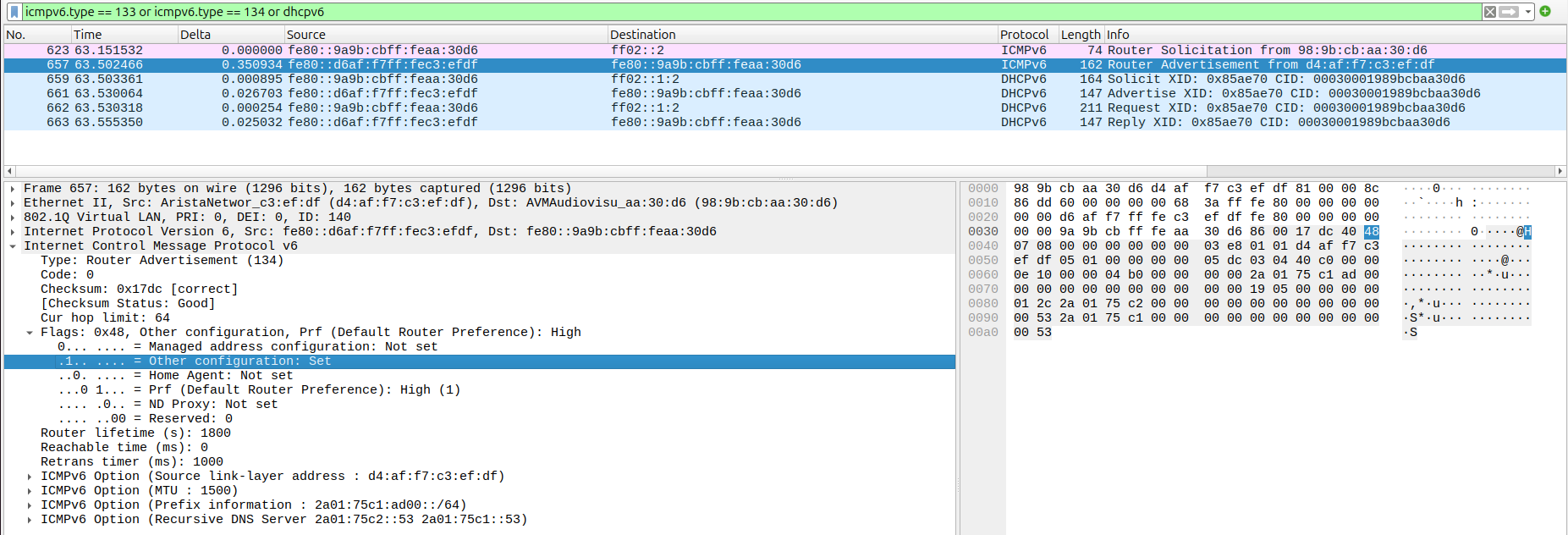
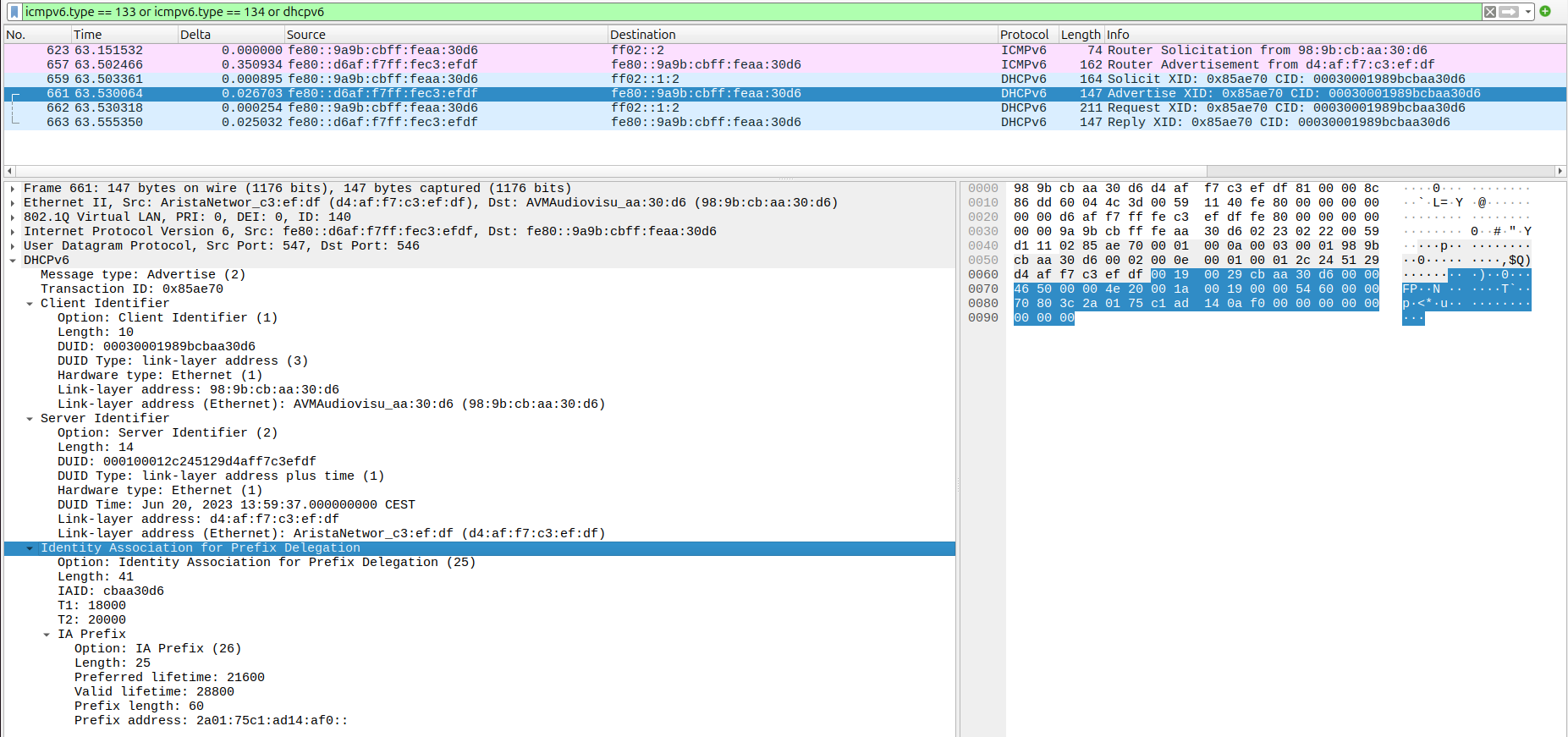
But no matter how long I let the captures run, I could not find periodic RAs but only the solicited one on connection start. And that was actually the whole problem: In IPv4 you receive your default gateway through DHCP option 3 (Router) but in IPv6 this isn’t handled via DHCP anymore. Instead, your default gateway is one of the routers you receive RAs from.1 If you stop receiving periodic RAs, the default router is assumed to be dead which causes your default route to be removed. Of course, I verified that assumption: See the ICMPv6 error message „no route to destination“ in Figure 5 which was sent back into my LAN by my FRITZ!Box.
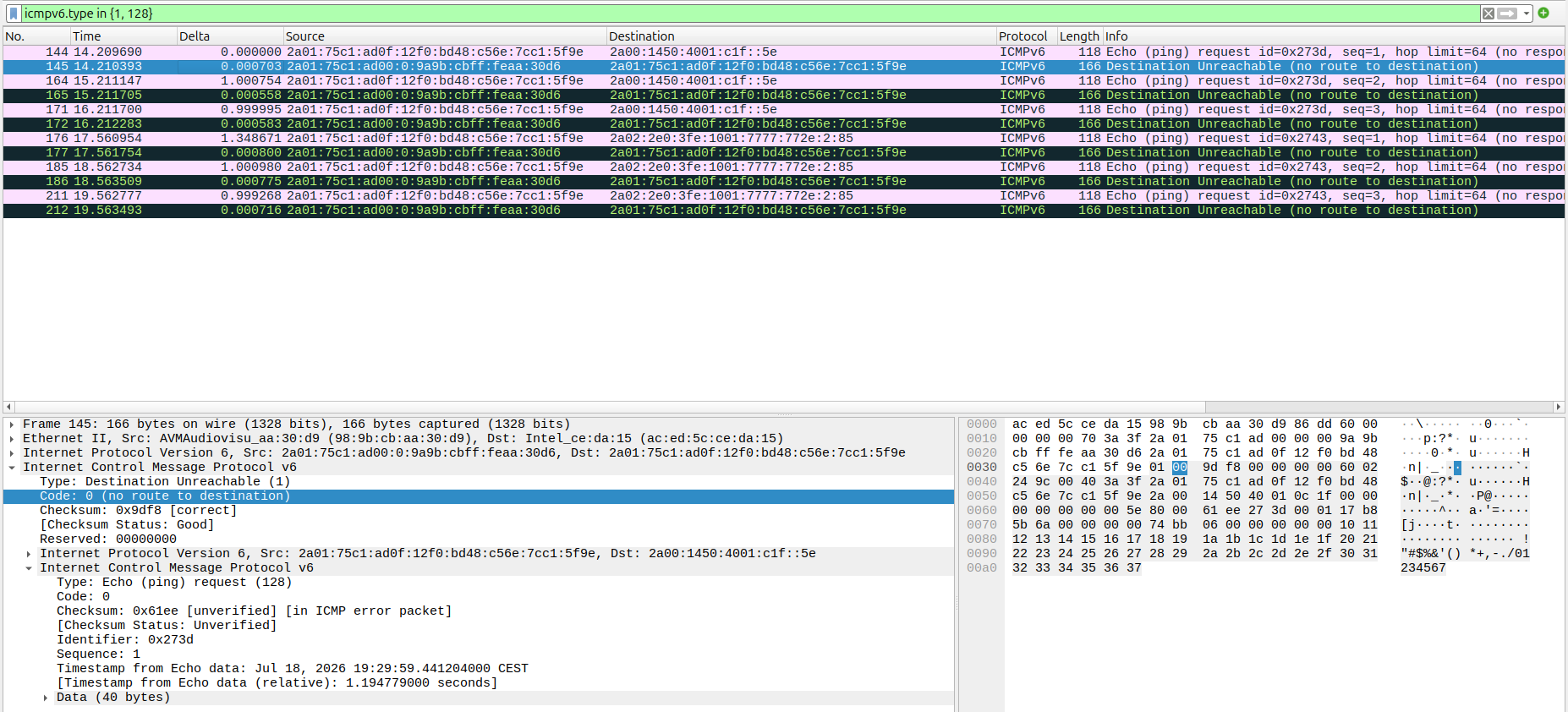
So, the problem was clear but how to fix that?! During my research I found this forum thread. The guy Janohmat had exactly the same problem with Vodafone and finally terminated his contract because they were not able to solve the problem. 🙁 At first, I decided to make a support request at FRITZ: When my FRITZ!Box receives only solicited but no unsolicited Router Advertisements, isn’t it possible to actively solicit a RA every few minutes by sending Router Solicitations periodically?! Unfortunately, there is no (hidden) config option to do so. They told that FRITZ!OS behaves correctly and there must be a misconfiguration at the ISP. Well, they are right. But thanks again for your competent response!
Let us think about the difference between a solicited and an unsolicited RA by taking a closer look into Figure 3, specifically the Ethernet Header of the RA. You can see that it is unicasted to the sender of the RS. This isn’t the case for unsolicited RAs which are instead multicasted to the all IPv6 nodes address ff02::1. So, the problem is likely to be caused by a multicast issue at my provider’s network. This was the moment when I contacted my former colleague Lutz Donnerhacke ⚡⛏️ a.k.a. Donner2 who works for my ISP. He told me that this is a known problem for fiber connections like mine which are so called L2BSA connections.
Layer 2 Bitstream Access (L2BSA) refers to a scenario in which a service provider makes his access infrastructure available to other service providers. These are retail service providers who provide their Internet services.
It seems that the access network provider somehow swallows multicast packets. And as always in large companies, the relevant technicans are almost impossible to reach. Lutz offered me to install a fix for my problem but it could take a few days.
Meanwhile, I played around with my FRITZ!Box’s internet settings and actually achieved to maintain a stable IPv6 GUA address on my WAN interface by using the following settings (I don’t translate the German wording):
- Native IPv6-Anbindung verwenden
- Globale Adresse ausschließlich per DHCPv6 beziehen („Die globale IPv6-Adresse der FRITZ!Box wird ausschließlich über DHCPv6 angefordert. Nutzen Sie diese Einstellung, wenn Sie eine Internetverbindung über TV-Kabel nutzen.“)
With these settings the delegated prefix as well as the WAN address were renewed repeatedly as one would expect. But nevertheless, connectivity broke after the Router Advertisement timed out. Nevermind, Lutz finally had the workaround ready. 🙌
I need to give a bit of background here: Lutz is very proficient in operating xDSL networks. But he is not a friend of simply using a „100k all-in-one Internet appliance“ – instead he likes using commodity hardware and putting some brainpower into it. For example, he developed his own Proxy-ARP daemon parpd which is even available as a FreeBSD package. It can be used to enable xDSL customers which are isolated by split-horizon mechanisms to communicate with each other over a central routing instance. Read his articles under the above link if you are interested in.
Anyway, Lutz also made parpd IPv6-capable which means that it does not only support ARP but also the Neighbor Discovery Protocol. Additionally, there is a Router Advertisement option:
rad src dst op
If the source IP of router advertisement matches the CIDR value for src, then for all IPs in the ARP cache matching the CIDR value for dst the action defined by op is performed.
These are the lines he applied to his parpd config:
rad fe80::d6af:f7ff:fec3:efdf/128 178.19.226.0/24 tell
rad fe80::d6af:f7ff:fec3:efdf/128 178.19.227.128/25 tell
In other words: „For each Router Advertisement you see fromfe80::d6af:f7ff:fec3:efdf3 send an unicast RA to all clients from 178.19.226.0/24 or 178.19.227.128/25 where you have a valid ARP entry for.“
With these two lines Lutz fixed my IPv6 connectivity. Thank you! ⚡⛏️
2 Kommentare zu “How a Thunder fixed my IPv6 connectivity”
Great write-up on why stateful DHCPv6 can’t replace Router Advertisements. The detail that the WAN address only had a one-hour lifetime while the /60 delegated prefix got 28800 seconds is a subtle one, and the figures make it easy to follow. A useful reminder that routing over link-local next hops may work fine while missing RAs still break things in surprising ways.
Thank you for pointing out this interesting problem.